arv
Archive, Record, Verify: long-term archives on Blu-ray that explain themselves, and can be read, checked and repaired decades from now without this tool.
Experimental. No disc made with it has yet been read back after years on a shelf, and the disc format is a draft that may still change. Treat anything you make with it as an extra copy while you try it.
Written largely by an AI coding assistant, with a human choosing the direction and reviewing the results. It has tests, but expect bugs. That's why we'd like your feedback.
What it does
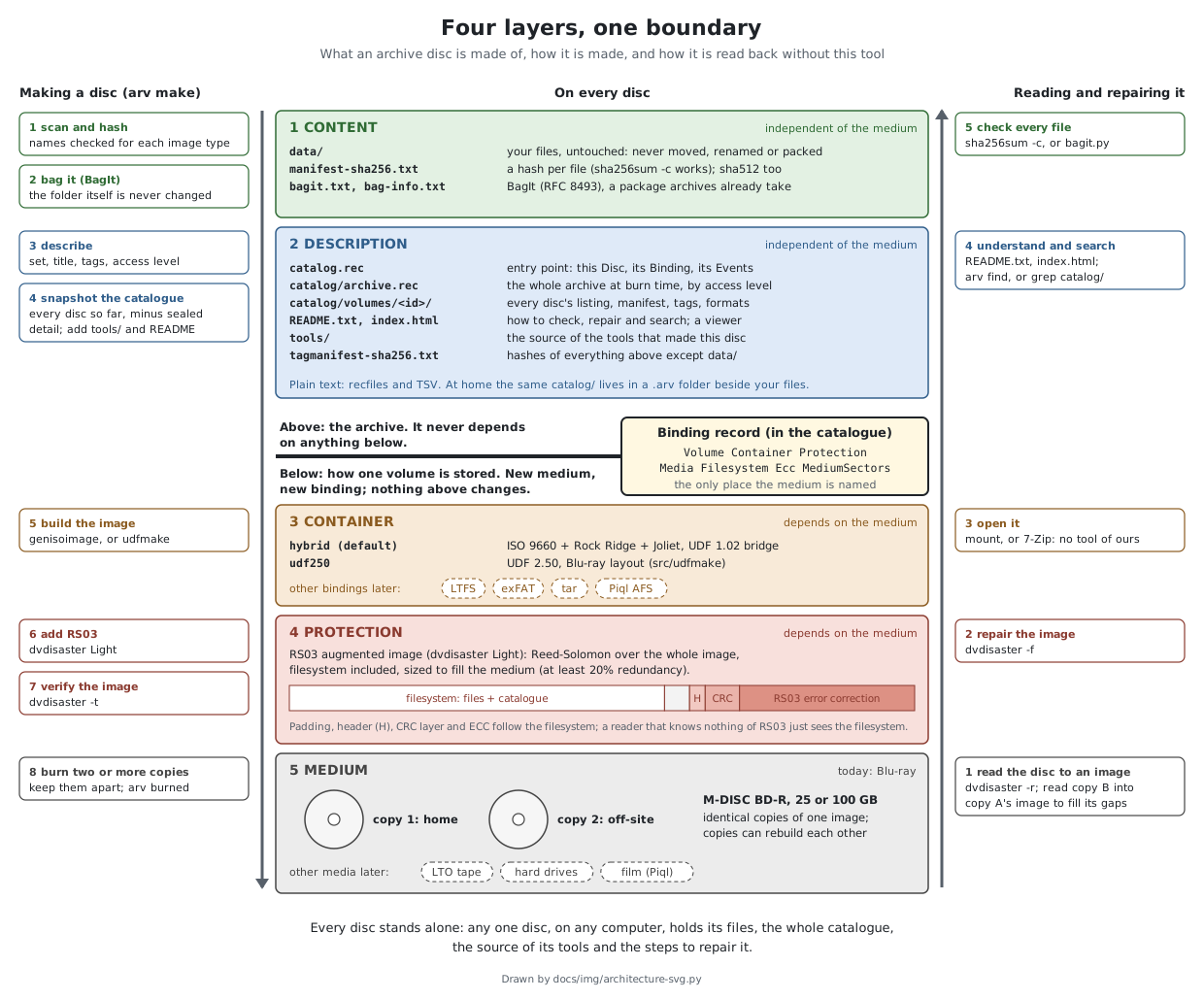
- Your files stay plain files. No packing, compression or proprietary container: any computer can open the disc and copy them off.
- Every disc stands alone. Each one carries a hash of every file, a
catalogue of the whole archive so far, the source of the tools that made it, and a
README.txtwith the steps to check and repair it. - Damage can be repaired. dvdisaster's RS03 error correction fills the rest of each disc, and two damaged copies can rebuild each other.
- Open standards, plain text. BagIt, recfiles and TSV, UDF or a hybrid ISO 9660 image. Nothing on a disc needs this tool to be read.
Try it
You need Linux, git and Python 3. Nothing is installed and nothing is burned
in the first two steps.
1. Look around the sample archive: seven small sample discs (40 MB in all) and their catalogue.
git clone https://github.com/mofosyne/arv
cd arv
./arv --home samples/home list          # the discs, and where they are kept
./arv --home samples/home find kyoto    # which disc holds it
./arv --home samples/home gui           # the same, in your web browser
The disc images are in samples/discs/: open one with your file manager or 7-Zip and
read its README.txt.
2. Make a test image of a small folder (needs genisoimage).
--no-ecc skips error correction, so you don't need dvdisaster yet; a separate
--home keeps the trial apart from anything real.
sudo apt install genisoimage
./arv --home /tmp/arv-try make ~/some/small/folder --no-ecc --output-dir /tmp
./arv --home /tmp/arv-try list
3. When you want real discs: install it, build dvdisaster Light for the error correction, and follow the workflow guide.
make install PREFIX=~/.local
cd /path/above/your/files && arv init --name home --default
arv make /path/to/folder
To remove it again: make uninstall PREFIX=~/.local in the same folder. That removes
the program only; your catalogues (.arv folders) and discs stay as they are.
Tell us how it went
Feedback of any size helps: a step that confused you, something that broke, a disc that would not read back, or a reason you would not trust it with your files.
Read more
- README: install and every command
- Workflow: from a folder to discs on a shelf, and back
- Philosophy: why it works this way
- Disc format: for anyone who wants to read or write these discs with their own tools